DIY Laptop v1

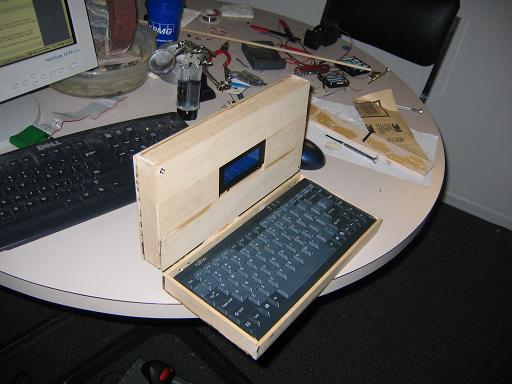
I had an idea for a project bouncing around in my head for a long time to build a “self-hosted development platform.” I felt like I had missed out on all the homebrew computing fun of the 1970′s and 80′s, and I wanted to try to build a computer that I could actually write and run code on. Using a Picaxe-18X microcontroller, along with a 20×4 character LCD screen, an external 24LC512 EEPROM and a tiny PS/2 keyboard, I made the DIY Laptop.
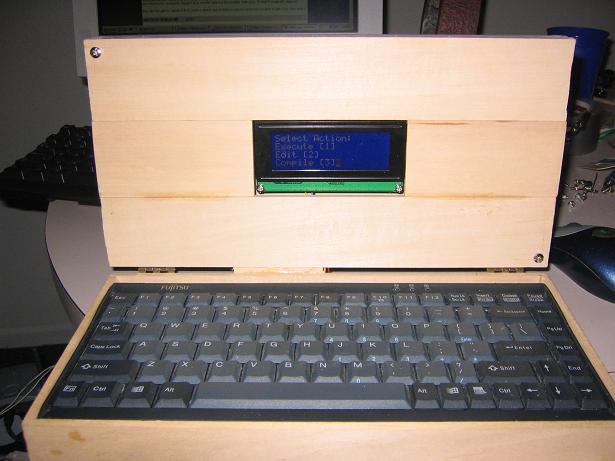
image003

The software environment has 4 main components:

1) Program Manager  -  This is just a simple menu system for choosing which program/task to run. There is no true filesystem, but the program manager uses “slots” where a fixed number of programs could be stored. There were 10 slots for executable programs and 4 slots for text files.

2) Text Editor  -  I needed a way to type in code, so I wrote a simple text-editor that used 6-character lines to enter in code – 3 characters for an Op-code and 3 characters for an argument. There was no support for comments, line numbering, inserting/deleting lines, etc. It was extremely limited, but it lets you pretty easily type in short programs.

3) Compiler  -  It’s more of a “tokenizer/assembler” than a compiler, but I needed a way to convert plain ASCII into a more compact form for speed/memory purposes. This will read in a text file and convert each opcode/argument pair into a 2-byte instruction. It starts from the beginning of the text file, and runs until it gets to a line labeled “XXX” instead of an accepted opcode. It then stores the “compiled” code in one of the 10 available program slots.

4)  Interpreter – Due to the way a PIC microcontroller is structured (and consequently the Picaxe), it can’t actually alter its own machine code. The solution was to run a “virtual machine”/interpreter for a language I made up called “Chris++” with the following opcodes:

  • LOAD
  • ADD
  • COMPARE
  • SUBTRACT
  • JUMP
  • Jmp-IF-EQUAL
  • STORE
  • LOAD_IMMEDIATE
  • SerToSlave
  • MULTIPLY
  • DIVIDE
  • JmpNEQ
  • GETKEY
  • WAIT_FOR_SLAVE
  • SET_SBID
  • READ_ADC
  • Get_SBID
  • DISPLAY
  • AND
  • OR
  • XOR
  • ANDNOT
  • ORNOT
  • XNOR
  • End
  • RTN

The language started off as an emulator for a simple 6-bit processor I had designed using schematic capture, but gradually developed into a full, if limited, language.

Why is this so cool? Programming is easy…

Mainly because 1) I actually did it. The parts are pretty easy, but it was a hassle to get everything working properly in such a limited environment, and 2) It all fits into 2 kilobytes of BASIC code! That is *not* a lot of space to fit a text editor, assembler, program manager, and interpreter, even if you do get to use a “high-level” language like BASIC.

Where is the code?

In the spirit of open-source, here is the full source code for everything! Its not commented very well (and some of the comments are just plain wrong), but it’s free, it works, and you’re free to play with it.

LaptopOSv1.BAS

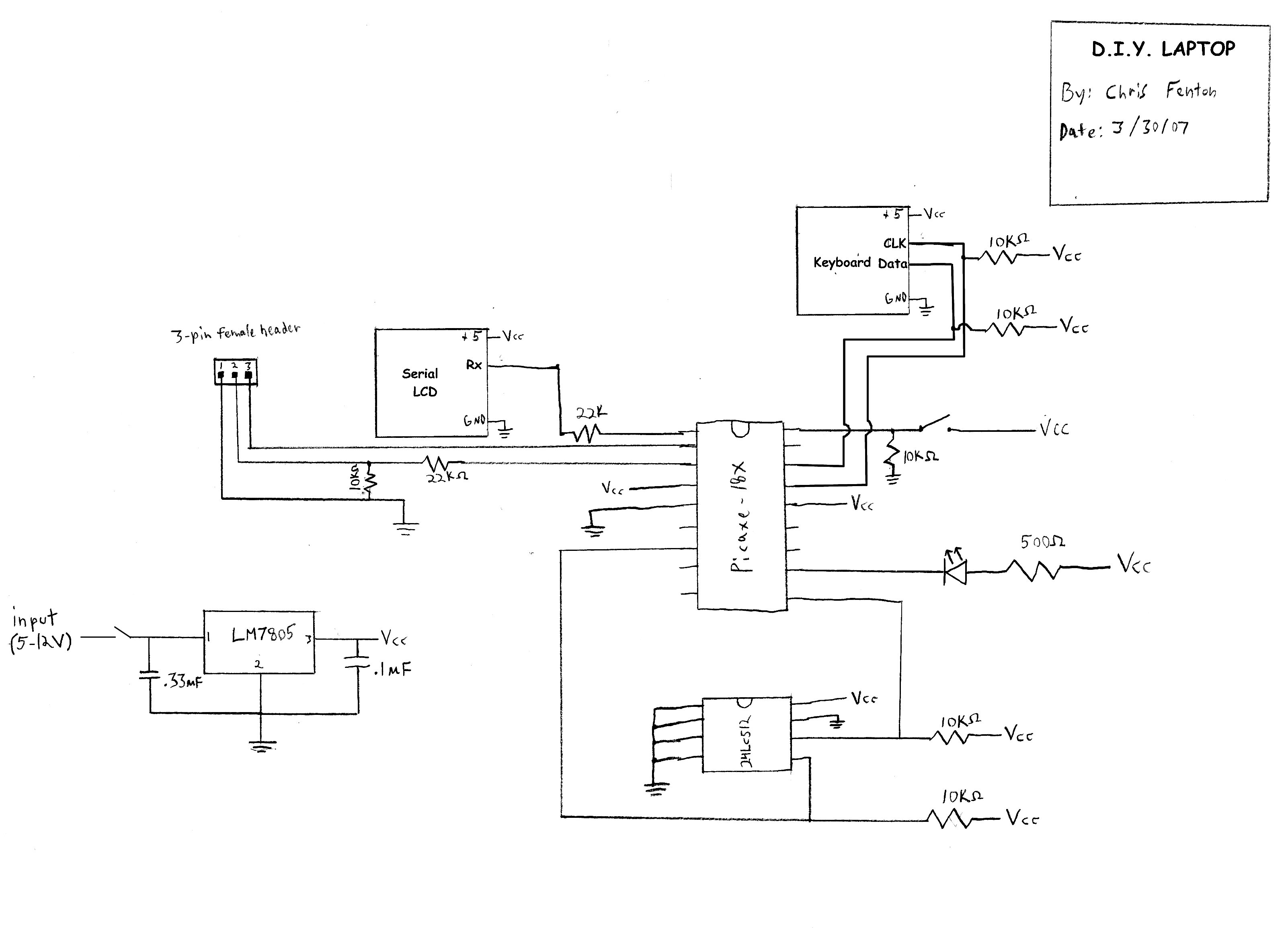
And Schematics?

Ask and you shall receive (right-click -> View Image for larger image)
laptopschematic1

More Pictures!

image004

Here you can actually see how awkwardly large it is.
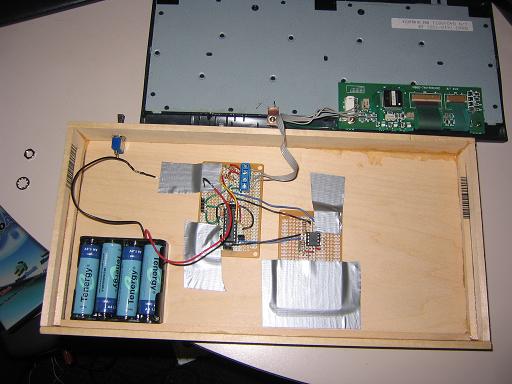
image002

Here is a shot of the laptop with the insides exposed.
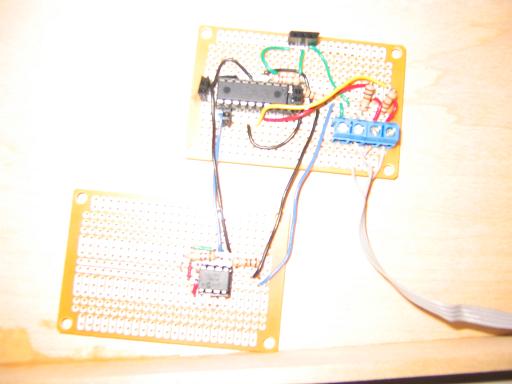
image001

Here is a close-up of the circuit boards I used. It’s a *very* simple circuit.
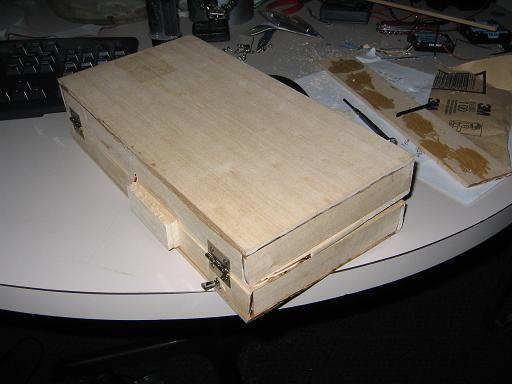
image005A nice shot of it closed with the hinges and power switch visible.

54 thoughts on “DIY Laptop v1

  1. Wonderful website. A lot of useful information here. I’m sending it to a few pals ans additionally sharing in delicious. And certainly, thank you for your sweat!

  2. Just want to say your article is as astonishing. The clearness to your publish is just nice and i can suppose you’re a professional on this subject. Fine with your permission let me to snatch your feed to stay up to date with forthcoming post. Thanks one million and please continue the enjoyable work.

  3. I simply want to mention I am just new to blogging and actually enjoyed this web page. More than likely I’m planning to bookmark your blog . You actually have superb article content. Thank you for revealing your blog site.

  4. TFile – популярный, открытый и быстрый торрент-трекер основанный в 2006 году. За время своего существования завоевал доверие миллионов пользователей во всем мире. На ТФайле пользователи могут абсолютно бесплатно скачать фильмы, сериалы, игры, музыку, книги и многое другое, причем без регистрации.

  5. Youre not the average web site writer, guy. You definitely have anything potent to add on the internet. Your design is so powerful that you could virtually get away with being a poor writer, but youre even amazing at expressing what you have to express. Such a excellent blog. Ill be back for a lot much more.

  6. The most comprehensive and extremely well thought out write-up I have found on this subject on the net. Keep on writing, I will keep on visiting to read your new content. This is my fifth time visiting your website .

  7. I appear to be having a hard time subscribing to your Feed. It shows as an 500. Let me know if this is a common error or if its just happenting to. Ive tried Chrome and IE. Im using Bullguard Firewall and im not certain how I can turn it off . Im not that good with PCs. I’ll bookmark your website and see if you have responded. cheers!

  8. I understand that you will find a lot of spam lately. Apparently its pretty difficult for guys to grasp the concept that relationships can be mutually beneficial. I can leave a meaningful fantastic comment and add content and substance to 1 of your pages and you will give me a link in exchange. There are too many takers out there and they arent willing to help people out. Take take take! .

  9. Hi,br /Being the female friends and family cook, FFC?, in our household, I often approach the kitchen for a drag. I found your site hunting to explore pan sauces and also identified “real” sauteing! Fantastic instructions! I have found this so intimidating. Now I’m inspired to test out the latest quick cooking method that never ever designed sense in advance of. Thank you!

  10. I seriously love your blog.. Great colors & theme. Did you build this website yourself? Please reply back as I’m attempting to create my own personal website and would love to find out where you got this from or just what the theme is named. Cheers!

  11. I’ll gear this review to 2 types of people: current Zune owners who are considering an upgrade, and people trying to decide between a Zune and an iPod. (There are other players worth considering out there, like the Sony Walkman X, but I hope this gives you enough info to make an informed decision of the Zune vs players other than the iPod line as well.)

  12. It seems to me that this web site doesnt load up on a Motorola Droid. Are other people having the exact same issue? I enjoy this web site and dont want to have to miss it any time Im gone from my computer.

  13. Wanted to drop a remark and let you know your Rss feed is not functioning today. I tried including it to my Google reader account and got absolutely nothing.

  14. It appears to me that this web site doesnt download in a Motorola Droid. Are other folks getting the exact same problem? I like this webpage and dont want to have to miss it any time Im gone from my computer.

  15. I wanted to thank you for this fantastic write-up, I certainly loved each and every small bit of it. I’ve bookmarked your internet site to look at the latest stuff you post.

Leave a Reply

Your email address will not be published. Required fields are marked *

*

You may use these HTML tags and attributes: <a href="" title=""> <abbr title=""> <acronym title=""> <b> <blockquote cite=""> <cite> <code> <del datetime=""> <em> <i> <q cite=""> <strike> <strong>